Browse > Home / Archive by category 'Handy tools and technology'

Tool of the week for journalists: Data.gov.uk’s map-based search

Tool of the week: Data.gov.uk’s map-based search

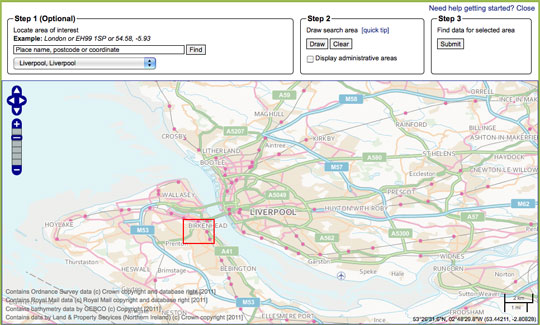
What is it? An option of searching for data sets by geographical location

How is it of use to journalists? Since the launch of Data.gov.uk just over two years ago, and the promotion of open government data, the site has become a go to place for many journalists in search of a data set.

The site now has a map tool which allows you to search for data by location, potentially useful for journalists working on local news sites, newspapers and radio stations.

The map-based search allows you to draw a search area, submit the area and find data relating to that location.

Not tried your hand at data journalism? This guide written for Journalism.co.uk by Simon Rogers, editor of the Guardian’s Datablog tells you how to get a grip with data journalism.

  • Journalism.co.uk also offers a one or two-day course in data journalism, led by Kevin Anderson. The next introduction to data journalism courses are being held on 9 May or 28 May. The intermediate data journalism course will be on 29 May. Those looking to expand their skills quickly can book on both courses, turning it into a two-day course and saving £50 on the course fees.

Tags: , , ,

Similar posts:

Tool of the week for journalists: Cuttings.me

Tool of the week: Cuttings.me

What is it? An easy to use portfolio tool created by a freelance journalist for freelance journalists.

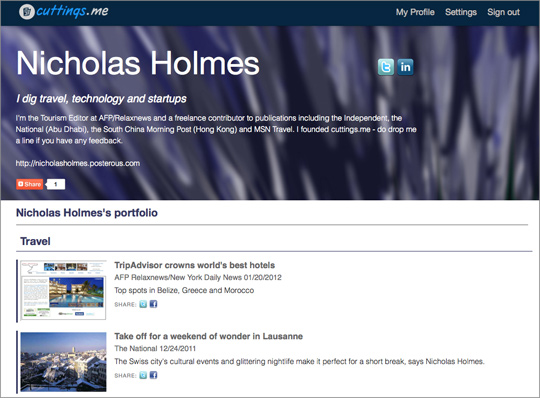
How is it of use to journalists? Cuttings.me was built by freelance journalist Nicholas Holmes who wanted a way of presenting links to his best work.

Launched in October, Cuttings.me now has thousands of links and is being used by journalists from the BBC to the New York Times to Al Jazeera. You can see Nicholas Holmes’ portfolio at Cuttings.me/nicholasholmes.

Last week it was been adapted and redesigned with the help of feedback from other users.

As of this today, Cuttings.me has a “multimedia clippings” feature, which opens up Cuttings.me for broadcast journalists too.

Another feature released today is RSS, allowing anyone who wants to subscribe to a feed of your best work to have an easy way of doing so.

RSS was “one of the most-requested features since the redesigned site launched late last year”, according to Holmes, who is is tourism Editor at AFP/Relaxnews and a freelance contributor to other publications including the Independent.

It’s quite a major upgrade and means users will be able to activate a personal RSS feed of their work, allowing them to easily export their cuttings to sites such as Facebook and LinkedIn to ensure all of their contacts are kept up-to-date, whenever they add a new piece to their Cuttings.me page.

A short video on how to get started with Cuttings.me is below.

Tags: ,

Similar posts:

App of the week for journalists – Google Latitude, for adding locations to stories

App of the week:Google Latitude

Phones: iPhone, Android, BlackBerry, Windows Phone, Symbian

Cost: Free

What is it? An app, web app, website and mobile site that allows you to add your location to a Google Map.

How is it of use to journalists? This was tip picked up from Paul Gallagher, head of online content at the Manchester Evening News.

During a session on mobile reporting at news:rewired, a conference about the latest trends in digital journalism, Gallagher explained how the MEN online newsdesk has encouraged reporters to use Google Latitude to add locations two paricular stories.

When Manchester City and Manchester United faced each other at Wembley in the FA Cup final in 2011, MEN sent reporters on the fan buses and created atmosphere by reporters geotagging locations as they travelled, using Google Latitude on a mobile phone.

MEN also used Google Latitude when reporting on roadworks, liveblogging a slow journey.

Tags: , , , ,

Similar posts:

#Tip of the day from Journalism.co.uk – efficiency tools for journalists

Poynter has a post listing cheap and useful tools that can help entrepreneurial journalists be more efficient.

It recommends Evernote, Google Docs, tools for handling invoices, Dropbox and other file transfer tools, plus back-up solutions.

The full post is at this link.

Tipster: Sarah Marshall

If you have a tip you would like to submit to us at Journalism.co.uk email us using this link– we will pay a fiver for the best ones published.

Tags: , , , ,

Similar posts:

Is your blog in this PR database of 1.3 million blogs?

Press officers have long relied on databases of journalists in order to approach them for stories. PRs are now increasingly targeting bloggers, recognising their reach. One start-up has seized on this trend, creating GroupHigh, “a research engine” which crawls 1.3 million blogs in real-time.

Launched in April 2011 in Boulder, Colorado, the software allows PRs to search by keyword, location and blog traffic.

Listed in the Next Web’s top 20 social media tools of 2011, GroupHigh gets a ringing endorsement.

13. GroupHigh.com – If you haven’t tried GroupHigh yet, the next sentence might encourage you to do so. Ready? GroupHigh.com is the best blogger outreach research and engagement tool on the planet. The latest update (version three) makes it even easier for you to discover the most relevant blogs by keyword, style and receptiveness. Brilliant.

PRs who pay for access can ask the database for “a list of every mum blog out there”, co-founder of the start-up Bill Brennan told Journalism.co.uk. You can then ask the software to “tell me the ones that have written about baby formula or home schooling in the last year”.

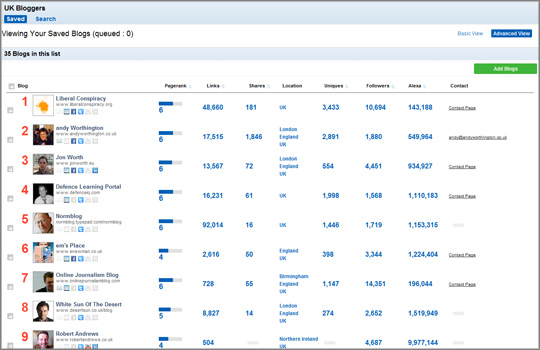
When I tested the software and searched for “UK bloggers”, left-leaning political blog Liberal Conspiracy was listed at number one (see screen shot below).

The location search works by “triangulation”: crawling the blog, its Facebook page and Twitter feed, Brennan explained.

Users can also filter by page rank, Facebook shares or Twitter followers and export the data to Excel.

Version three of the software lists blogs not bloggers, Brennan said.

We’ll probably add contacts for individual bloggers at each blog as part of version four.

GroupHigh is the co-founders’ second start-up. Their first foray was recipe search engine Recipe Bridge, which they sold to an Australian ad network.

Confident in their ability to build software to crawl the web and realising “it’s difficult to make money [from] advertising”, the pair “started to tap into the blogosphere”, Bill Brennan said, noting a changing trend within the PR industry.

It seemed like blog outreach was really becoming a staple of campaigns for their clients.

Brennan added that PRs were finding the big bloggers, such as TechCrunch, but “they were not tapping in to what we call the ‘magic middle’” of less well-known blogs.

The cost of using the software is likely to preclude bloggers from satisfying their curiosity and checking if their site is crawled. An annual GroupHigh licence for PRs costs $3,000 (£1,926), plus $1,000 (£642) for each additional user.

Below is a video demo of how GroupHigh works.

GroupHigh 3 Video Overview from Andy Theimer on Vimeo.

Tags: , , ,

Similar posts:

Tool of the week for journalists – Formulists (use it before it disappears)

Tool of the week: Formulists

What is it? A tool to create smart Twitter lists (and more).

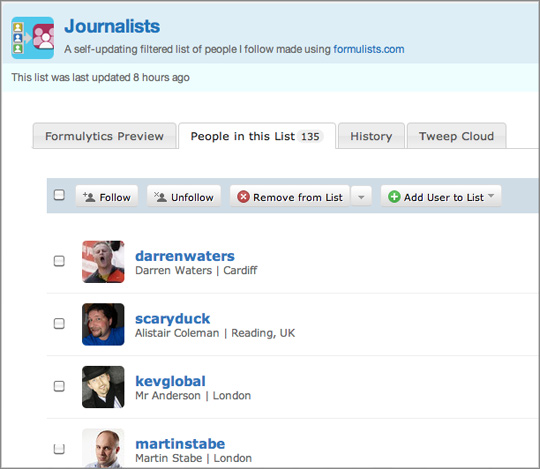
How is it of use to journalists? Formulists is a fantastic tool to create Twitter lists. Simply sign in with your Twitter account, search for a keyword such as “journalist” and Formulists will create a Twitter list of all the people you follow with the word “journalist” in their profile. Formulists found that 135 people I follow include the word journalist in their profile, for example. Here is the Twitter list.

But be warned: Formulists is shutting down. You can still create lists but they will no longer be automatically updated.

It is a real shame this tool is being pulled, particularly as Twitter lists are a great way for journalists to filter those they want to follow and focus on. If your “all friends” stream has become too busy, make it more manageable by creating lists based on keywords while you still can. Your lists will not be updated as you follow additional Twitter users but Formulists provides a great way to start creating new lists.

It is worth exploring Formulists as it allows you to do more than simply create lists, such as allowing you to search for new Twitter users by topic.

The Formulists blog also points out some additional Twitter filtering tools.

Tags: , ,

Similar posts:

Audio Notetaker, software for adding notes to audio, launches Mac version

January 18th, 2012 | No Comments | Posted by in Handy tools and technology

Audio Notetaker, software designed to help journalists record interviews, organise quotes and add notes and images to specific points in a recording, has launched a Mac version.

The software, made by UK-based company Sonocent, has previously been available for PCs.

It is also aimed at students attending lectures and people attending meetings with a need to record and navigate through audio.

Both versions offer a 30-day free trial, which allows you to test it out before you buy.

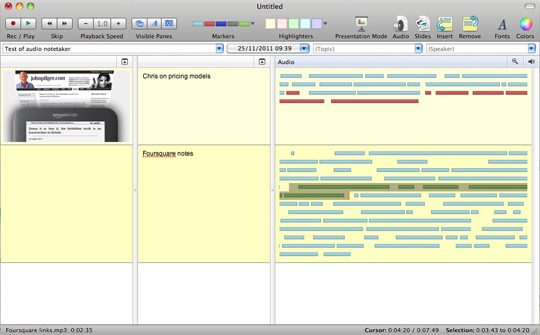
The platform allows you to import or record audio, displaying it as bars (see picture below). The spaces between bars signify pauses where the speaker has taken a breath between sentences.

Audio Notetaker also allows you to re-order and edit the recording.

You can highlight various bars, making it easy to find a quote in the recording, no doubt a useful feature for journalists working on a complex and legally sensitive story as audio can be labelled.

The free trial version comes with a lengthy tutorial introducing you to the platform.

After the month-long period trial expires costs are £47.99 for a once-year licence or £95.99 for a a full licence.

Tags: , ,

Similar posts:

#Tip of the day from Journalism.co.uk – tools for journalists from CES 2012

The International Journalists’ Network has produced an interesting list of five “gadgets” showcased at the Consumer Electronics Association, explaining how they  may be of use to journalists.

These include a tracking system, a mobile phone which can be powered by an AA battery and a “Bluetooth camera remote and flex mount”.

Tipster: Rachel McAthy

If you have a tip you would like to submit to us at Journalism.co.uk email us using this link – we will pay a fiver for the best ones published.

Tags: , ,

Similar posts:

Tool of the week for journalists – ProPublica’s TimelineSetter

Tool of the week: ProPublica’s TimelineSetter

What is it? A tool for creating beautiful interactive timelines.

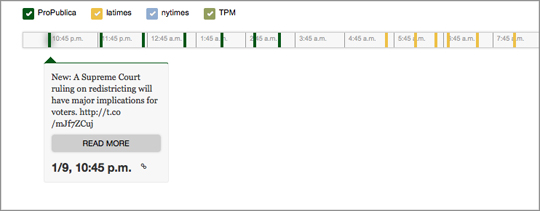
How is it of use to journalists? Having spent time developing a timeline tool, US investigative journalism news site ProPublica has made the code available for others to use, enabling journalists to build interactive timelines from a spreadsheet.

ProPublica’s timeline on how one blast affected five soldiers is a clear demonstration as to just how effective the tool can be in online storytelling.

The LA Times and Chicago Tribune are among those who have utilised the open source software since it was made public in April 2011.

TimelineSetter is not for the technology shy, however. Non-coders should not let this introduction to the tool put them off and should instead try watching the two videos embedded below and test out the technology.

Let us know at @journalismnews if you build and publish a timeline using ProPublica’s code.

If you want to create a timeline but avoid coding, try Dipity, a previous Journalism.co.uk tool of the week.

Hat tip: 10,000 Words

Tags: , ,

Similar posts:

App of the week for journalists – iSaidWhat?

App of the week: iSaidWhat?

Operating systems: Apple (iPhone, iPod Touch and iPad)

Cost: £0.69

What is it and how is it of use to journalists? iSaidWhat? is a well thought out audio app that allows you to record and edit clips.

It allows you to alter the recording input level, write a script that you can access from the main recording screen and edit by trimming and arranging clips. You can share clips via email (via m4a or wav formats) or over a wireless network.

Reviews: It gets three stars in iTunes App Store.

Recommended by: ABC NSW political reporter @MarkTobinSydney, ABC news reporters @RyanSheales and ABC journalist @Wendycarlisle

Have you got a favourite app that you use as a journalist? Fill in this form to nominate an app for Journalism.co.uk’s app of the week for journalists.

Tags: , ,

Similar posts:

© Mousetrap Media Ltd. Theme: modified version of Statement