Browse > Home / Archive by category 'Data'

#Tip of the day from Journalism.co.uk – data journalism inspiration

April 3rd, 2012 | No Comments | Posted by in Data, Online Journalism

Mindy McAdams has created a Storify featuring lots of examples of data journalism to inspire budding data journalists, as well as background reading and other resources, which she has posted on her blog.

Examples include projects by the New York Times and ProPublica.

See the post here.

Tipster: Rachel McAthy

If you have a tip you would like to submit to us at Journalism.co.uk email us using this link– we will pay a fiver for the best ones published.

Tags: , ,

Similar posts:

#Tip of the day from Journalism.co.uk – try this tutorial on using Google Fusion Tables

March 28th, 2012 | No Comments | Posted by in Data, Top tips for journalists

At the Guardian Open Weekend Kathryn Hurley from Google and Simon Rogers, editor of the Guardian’s Datablog, ran a session on using data and working with Google Fusion Tables.

Kathryn Hurley has helpfully published her workshop notes on Google Fusion Tables online. They act as a step-by-step guide to getting started in data journalism using the free software from Google.

Simon Rogers has also published his slides on Fusion Tables and an explanation of how the Guardian uses data.

Journalism.co.uk runs training courses in data journalism led by Kevin Anderson. There are two levels: introduction to data journalism, being held on 9 or 28 May, and intermediate data journalism, which will run on 29 May.

Those looking to expand their skills quickly can book on one of the introduction to data journalism courses and the intermediate course. If you book both options the cost is at the reduced rate. 

This is the last time we will be offering this course led by Kevin Anderson due to his commitments – so take advantage of the final opportunity to learn from this former BBC and Guardian journalist.


Tags: , , , ,

Similar posts:

#Tip of the day from Journalism.co.uk – how to scrape web pages

March 23rd, 2012 | No Comments | Posted by in Data, Top tips for journalists

Developer/journalist at ProPublica Dan Nguyen has a a series of tutorials on programming for journalists.

Here’s one to try: Go from knowing nothing to scraping web pages. In an hour. Hopefully.

Tipster: Sarah Marshall

If you have a tip you would like to submit to us at Journalism.co.uk email us using this link– we will pay a fiver for the best ones published.

Tags: , ,

Similar posts:

Tool of the week for journalists: freeDive, to create a searchable database

Tool of the week: freeDive

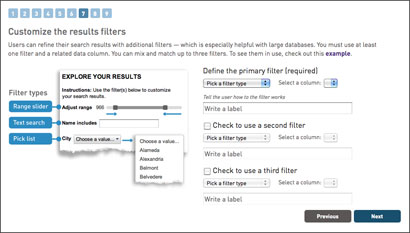
What is it? A wizard to turn a Google spreadsheet into a searchable, embeddable interactive

How is it of use to journalists? This is a fantastic tool from the Knight Digital Media Center, based at the UC Berkeley Graduate School of Journalism.

freeDive is a wizard that allows you to take a Google spreadsheet, turn it into an interactive database, embed it into a news story and let readers to explore the data.

A word of warning: the embed code created is mainly JavaScript which some platforms restrict.

WordPress users can download a plugin such as Artiss Code Embed which works with WordPress security settings, allowing you to embed JavaScript.

The tool generates a simple embed code and also has an option to allow you to download the HTML, upload it onto your server and use an iframe.

Here is one we made earlier. This searchable database shows the ABC-audited web traffic figures for regional news groups.


Tags: ,

Similar posts:

Tool of the week for journalists: Data.gov.uk’s map-based search

Tool of the week: Data.gov.uk’s map-based search

What is it? An option of searching for data sets by geographical location

How is it of use to journalists? Since the launch of Data.gov.uk just over two years ago, and the promotion of open government data, the site has become a go to place for many journalists in search of a data set.

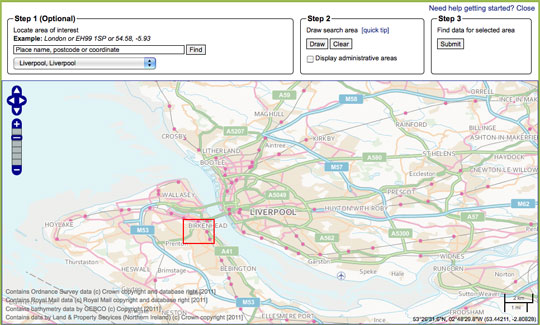
The site now has a map tool which allows you to search for data by location, potentially useful for journalists working on local news sites, newspapers and radio stations.

The map-based search allows you to draw a search area, submit the area and find data relating to that location.

Not tried your hand at data journalism? This guide written for Journalism.co.uk by Simon Rogers, editor of the Guardian’s Datablog tells you how to get a grip with data journalism.

  • Journalism.co.uk also offers a one or two-day course in data journalism, led by Kevin Anderson. The next introduction to data journalism courses are being held on 9 May or 28 May. The intermediate data journalism course will be on 29 May. Those looking to expand their skills quickly can book on both courses, turning it into a two-day course and saving £50 on the course fees.

Tags: , , ,

Similar posts:

Getstats: 12 ‘number hygiene’ rules for journalists in full

February 1st, 2012 | No Comments | Posted by in Data, Training

A campaign launched by the Royal Statistical Society has proposed 12 “rules of thumb for journalists” in order to encourage a better understanding of numbers in news.

Getstats is also calling for numeracy and statistics to be taught in journalism schools.

More details and a 12 point summary is at this link.

The full 12 rules of “number hygiene” for journalists are below:

1. You come across a number in a story or press release. Buyer beware. Before making it your own, ask who cooked it up; what are their credentials; are they selling something. What other evidence do we have (what numbers are they not showing us?); why this number, now? If the number comes from a study or research, has anyone reputable said it is any good?

2. Sniff around. Do the numbers refer to a whole group of people or things or a sample of them? If it’s a sample, are the people being questioned or the things being referred to a fair representation of the wider group? Say a company is claiming something applies to the population at large. If it is basing the story on a sample, such as a panel of internet users, the company goes back to time and again then beware: the panel may not be representative.

3. More probing. What was the sample asked? The wording of a question can hugely influence the answer you get. People’s understanding of what it means to ‘be employed’ or the nature of ‘violent crime’ may differ. What the public understands may not match the survey researcher’s idea. In government surveys bigamy was till recently classed as a violent crime. Might researchers’ choice of words have led people into a particular response?

4. One number is often used to sum up the group being measured, the average. But different averages measure different things. The mean is extremely sensitive to highs and lows: the very fact of Bill Gates coming to live in the UK would push up mean wealth. The median tells us, for example, the income of an average person – half the population get less, half more. Comparing earnings, the mode tells us the salary most people earn.

5. There is a lot of uncertainty about. We need to be sure the number on offer is a result and not just due to chance. With a sample, check the margin of error, the plus or minus 3 per cent figure, usually stated by reputable polling companies. A poll saying 52 per cent of people are in favour of something is not definitively saying half are in favour: it could be 49 per cent. Beware league tables, except in sports reports. Chelsea is higher than Arsenal for a simple and genuine reason: the side has collected more points. With hospitals or schools, a single score is a never likely valid basis for comparison (a teaching hospital may appear to have a worse score, but only because sicker patients are referred to it). Comparisons between universities or police forces are unreliable if the scores fall within margins of error. Midshires scores 650 on the ranking and Wessex 669: they could be performing at the same level or their respective positions reversed.

6. The numbers you are given show a big increase or sharp decrease. Yet a single change does not mean a trend. Blips happen often. Blips go away, so we have to ask whether the change in the numbers is just a recovery or return to normal after a one-off rise or fall (what statisticians refer to as ‘regression to the mean’). The numbers may come from a survey, like (say) ONS figures for household spending or migration. Is the change bigger than the margin of error?

7. Unless researchers carried out a controlled experiment (such as a trial of a new drug, based on a randomly chosen group, some of whom don’t know they are getting a placebo), it’s very difficult confidently to state that a causes b. Instead, the numbers may show an association (a correlation) between two things, say obesity and cancer. Beware spurious connections, which may be explained by a third or background factor. If use of mobile phones by children is associated with later behavioural disorders, the connexion could be the parents, and the way their behaviour affects both things. If the numbers suggest an association, the important thing is to assess its plausibility, on the back of other evidence. Finding a link can stimulate further study, but can’t itself be the basis for some new government policy. Recommendations for changing daily behaviour such as eating should not be based on speculative associations between particular food and medical conditions.

8. A key question for any number is ‘out of how many?’ Some events are rare — such as the death of a child. That’s why they are news, but that’s also why they deserve being put in context. Noting scarcity value is the way to reporting the significance of an event. An event’s meaning for an individual or family has to be distinguished from its public importance.

9. Billions and millionths are too big and too small to grasp. We take figures in if they are humanized. One way is comparing with, say, the whole UK; another is to plot the effect on an individual. Colourful comparisons can make risk intelligible: the risk of dying being operated on under a general anaesthetic is on average the same as the risk being killed while travelling 60 miles on a motorbike.

10. Good reporting gives a balanced view of the size of the numbers being reported. Better to focus on the most likely number rather than the most extreme, for example in stories about the effects of a flu pandemic. ‘Could be as high as’ points to an extreme; better to say ‘unlikely to be greater than’. Numbers may be misperceived so try to eliminate bias.

11. Risk is risky. ‘Eating bacon daily increases an individual’s lifetime risk of bowel cancer by 20 per cent.’ Another way of saying that is: out of 100 people eating a bacon sandwich every day one extra person will get bowel cancer. Using the first without noting the second tells a story that is both alarmist and inaccurate. If the information is available, express changes in risk in terms of the risks experienced by 100 or 100,000 people.

12. The switch from print to digital brings opportunities to present numbers more dynamically and imaginatively, for example in scatter plots. Graphics can show a trend. Stacked icons in graphs can show effects on 100 people. But the same rules of thumb apply whatever the medium: is the graphic clear; does it tell the story that is in the text.

Tags: , ,

Similar posts:

Tool of the week for journalists: Tableau Public, for data visualisations

Tool of the week: Tableau Public

What is it? A data visualisations tool, allowing you to create interactive graphs, charts and maps.

How is it of use to journalists? Tableau Public is a free tool that allows journalists to upload an Excel spreadsheet or text file and turn the data into an interactive visualisation that you can embed on your news site or blog.

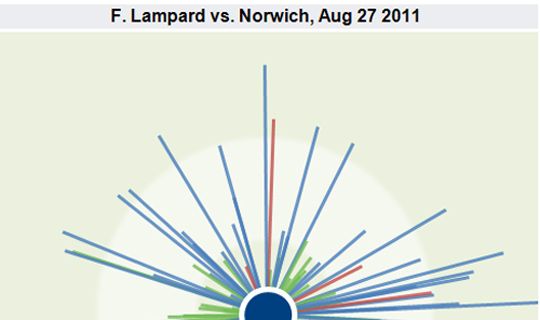
Here are five examples of how Tableau has been used by news sites to tell stories. A quick browse will give you a sense of how the tool can be used to explain news stories.

One of Tableau’s real strengths is providing the reader with the opportunity to move a slider or select a drop down and see how the visualisation alters when a variable changes.

In order to create a visualisation you will need a PC (or a Windows environment on your Mac) and to download the free software.

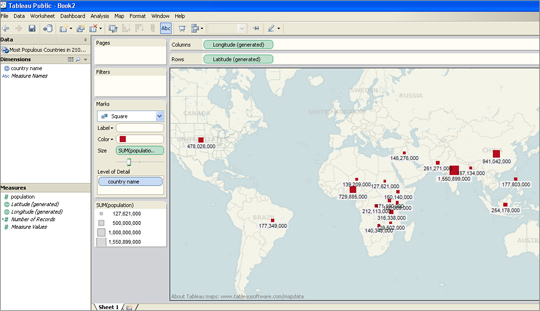
I was able to upload an Excel file and within less than two minutes had produced a map showing what are predicted to be the most-populous countries in 2100.

I had previously used this data set to create a visualisation in Google Fusion Tables and Tableau was equally easy to navigate.

For those who have not tried creating data visualisations, Tableau requires no technical ability and is easier to use than the wizard options that allow you to create graphs in Excel.

There are options for sorting and reordering data, plus changing the colours and view options.

Tableau also has a paid-for option. The difference between the free tool and the premium option is that Tableau Public requires you to publish your visualisation to the web.

Tableau launched version 7.0 a couple of weeks ago and will soon be adding functionality allowing you to create a map using UK postcodes, according to Ross Perez, data analyst at the US-based company.

Disclaimer: Tableau Public is a sponsor of the Journalism.co.uk-organised conference news:rewired. This relationship did not influence this review.

Tags: , , ,

Similar posts:

#Tip of the day from Journalism.co.uk – publishing data online

December 15th, 2011 | No Comments | Posted by in Data, Top tips for journalists

On the Help Me Investigate blog founder Paul Bradshaw outlines four ways data can be published online, which he says can be done “either for others to see the raw material, or to invite them to help you explore it”. His tips include using platforms such as Google Docs or BuzzData. Read the full post here.

Tipster: Rachel McAthy

If you have a tip you would like to submit to us at Journalism.co.uk email us using this link – we will pay a fiver for the best ones published.

Tags: , , ,

Similar posts:

#Tip of the day from Journalism.co.uk – using spreadsheets for data stories

December 7th, 2011 | No Comments | Posted by in Data

Poynter has a helpful lesson in Excel and other spreadsheet software for journalists dealing with data.

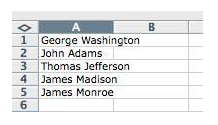
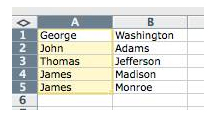
The post explains how to split names in a single column to two columns, for example.

Poynter’s post on how journalists can use Excel to organise data for stories is at this link.

There will be a workshop on data journalism – led by Simon Rogers, editor of the Guardian’s Datastore and Datablog – at Journalism.co.uk’s news:rewired – media in motion conference for journalists. The news:rewired agenda is at this link.

Tipster: Sarah Marshall

If you have a tip you would like to submit to us at Journalism.co.uk email us using this link– we will pay a fiver for the best ones published.

Tags: , ,

Similar posts:

Guardian study finds just 22.6% of journalists are female

December 6th, 2011 | No Comments | Posted by in Data, Journalism

The New York Times newsroom in 1942. By Marjory Collins [Public domain], via Wikimedia Commons

The Guardian today published the findings from its research into gender in the press, based on “a simple count of newspaper bylines” and those appearing on the Today programme on Radio 4.

The bylines were said to have been taken from articles published in a total of seven newspapers from 13 June to 8 July. The Guardian reports that the research, led by Kira Cochrane, found that women journalists accounted for just 22.6 per cent, as opposed to 77.4 per cent for male reporters.

National papers were all shown to have large gender gaps in byline averages. The Daily Mail and the Guardian recorded the lowest male dominance at 68 per cent male and 72 per cent male respectively.

In its ever-open approach to data the Guardian has made all the data available as a downloadable spreadsheet and is asking its audience to get involved by posing the question: “What can you do with this data?”

Read more here.

Research published earlier this year, commissioned by the Women in Journalism group, found that almost three quarters of journalists working in the national press were male.

Tags: , , ,

Similar posts:

© Mousetrap Media Ltd. Theme: modified version of Statement